Mipmapping
In games and other graphics applications it's often convenient to use a single texture that gets tiled across the surface. If you use a texture with some complexity, and your scene is large you'll get a lot of noise in the distances.
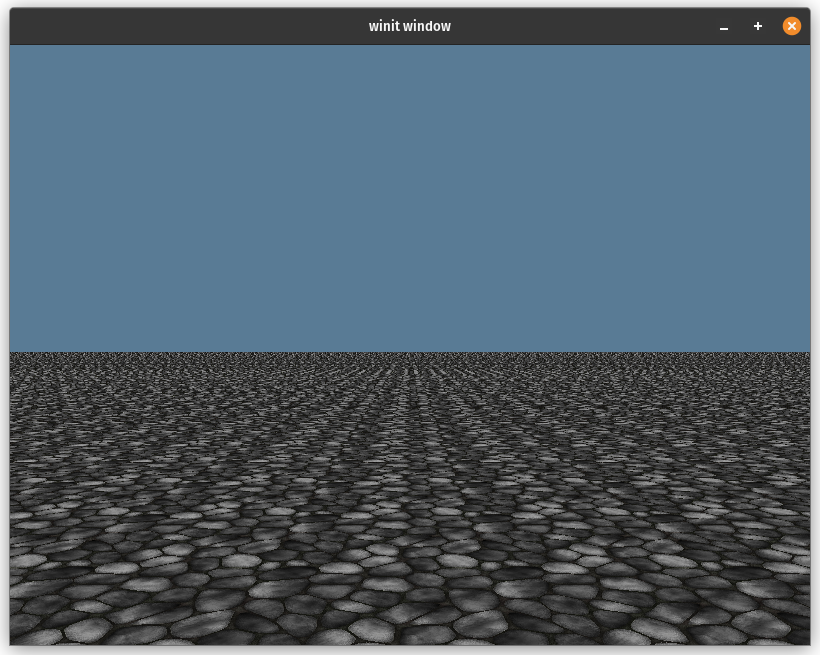
This looks really bad, but fortunately we can fix this with mipmaps.
What are mipmaps?
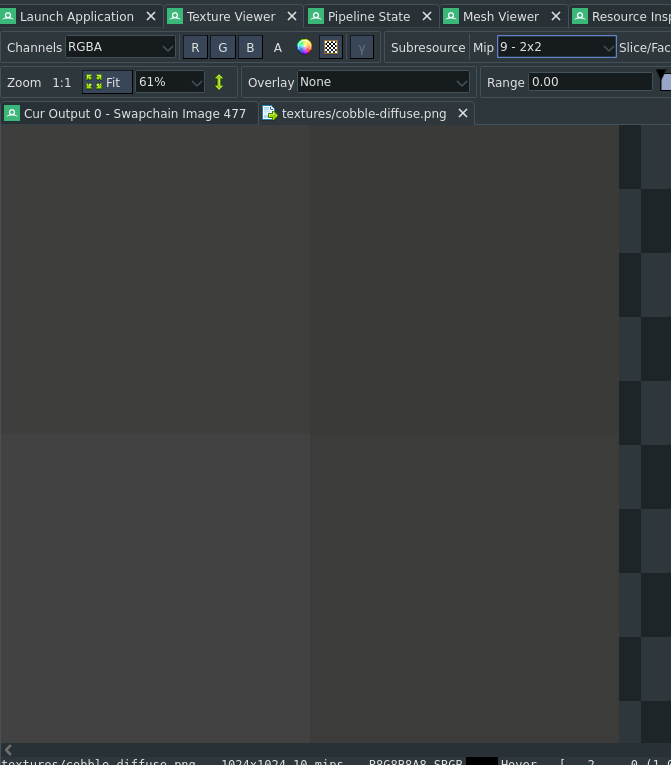
Mipmaps are smaller versions of an image that are stored in the same texture. Each mip is half the size of the one above it. Below you can see mip level 0, or the texture at full size viewed in RenderDoc.
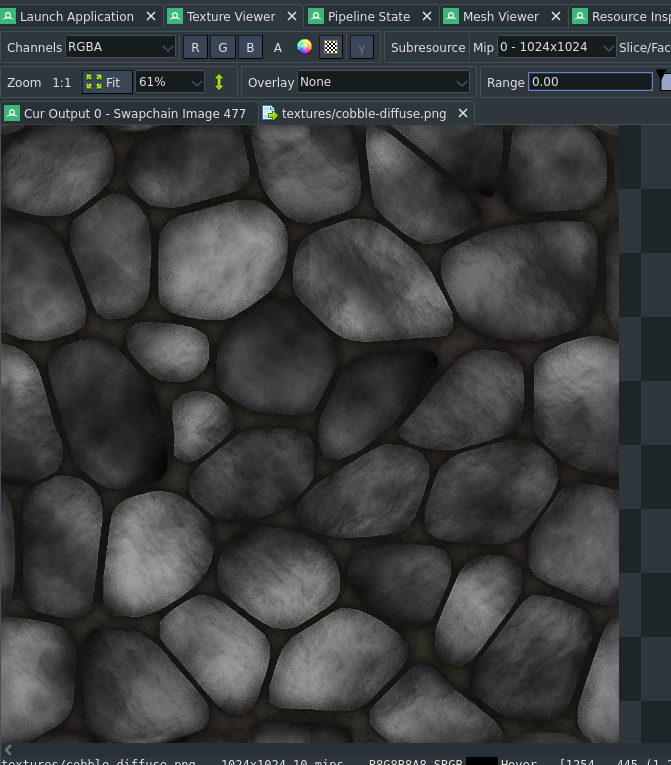
This is the full 1024x1024 image. The next level is 1 and looks like this:
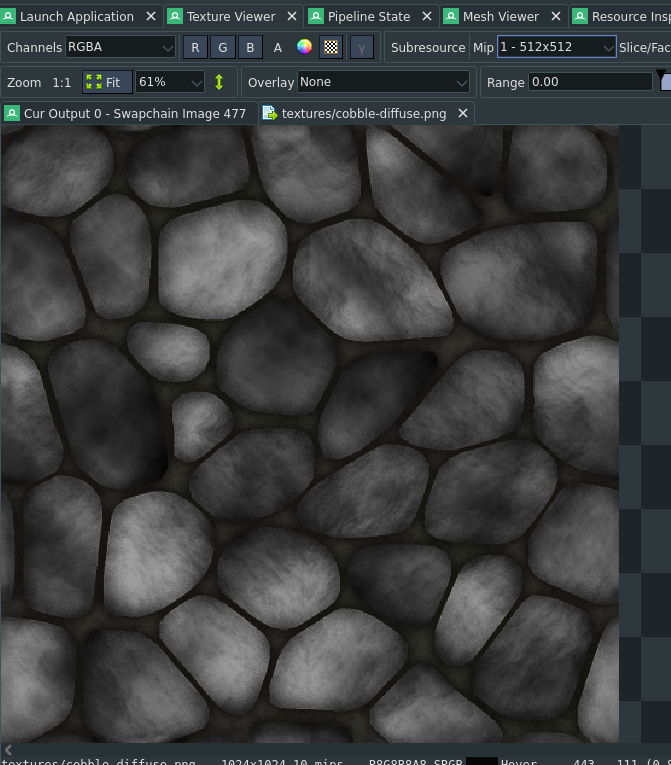
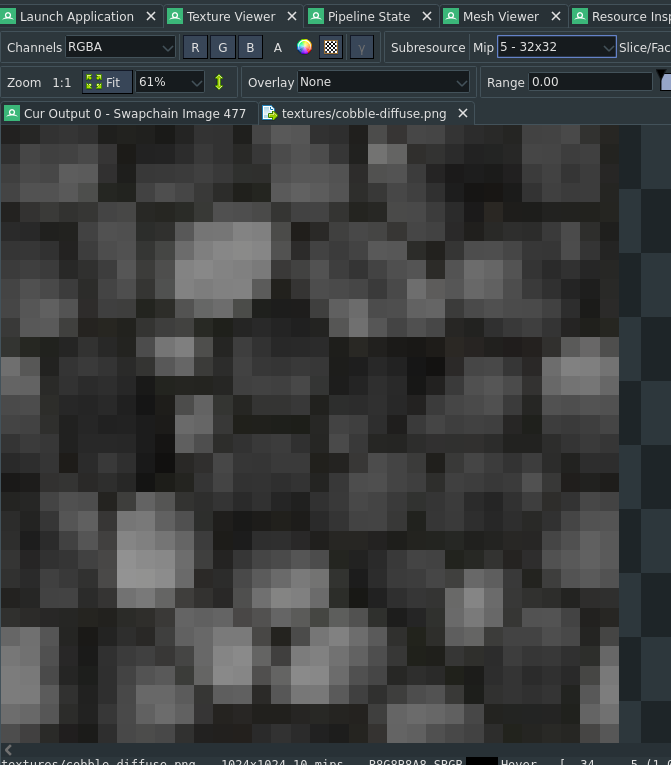
This is half the size of the original (512x512). Skipping the few here's level 5 which is 32x32.
Level 9 is just 2x2
You may be thinking, well that's nice and all, but how does it make our scene look less noisy? The trick is that when we sample a texture in the fragment shader, if the texture has mipmaps enabled the GPU will try to pick the best one based on how much space it thinks the texture will take up on screen. Here's what our scene looks like with a texture that has mip maps setup:
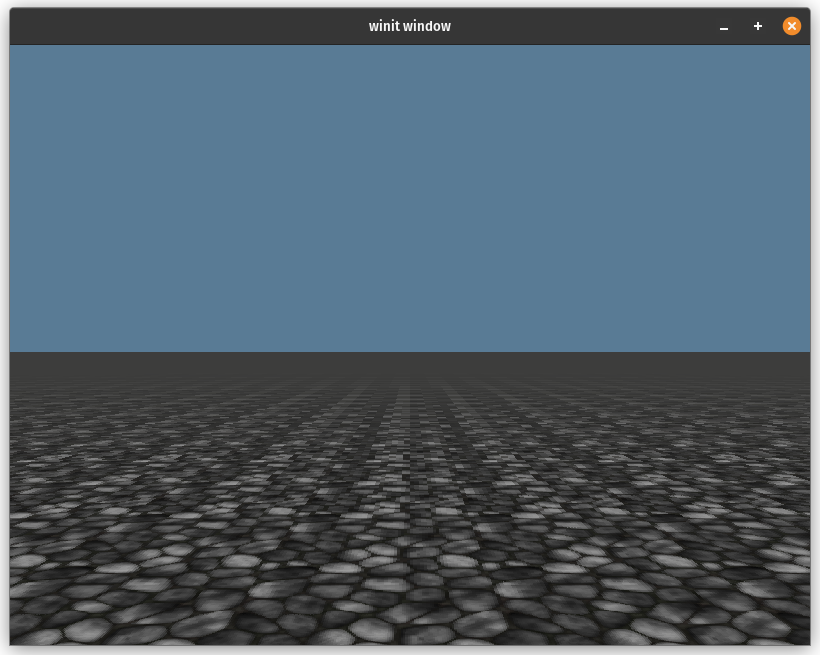
This looks a lot better as the horizon is no longer a noisy mess. Let's dive into how we achieved this.
Setting up mipmaps
I'll gloss over the code for rending the base scene as it's nothing special. I'm just rendering a textured quad thats 2000x2000 units large. The texture setup is more involved though. Let's dig into that.
// Load the texture with the [image] crate
let diffuse_img = image::open(res_dir.join("textures/cobble-diffuse.png"))?.to_rgba8();

// Here we compute the number of mip levels using the smaller of width and height
let mip_level_count = diffuse_img.width().min(diffuse_img.height()).ilog2() + 1;

// Now we create the texture
let diffuse_blit_texture = display.device.create_texture(&wgpu::TextureDescriptor {
    label: Some("textures/cobble-diffuse.png"),
    size: wgpu::Extent3d {
        width: diffuse_img.width(),
        height: diffuse_img.height(),
        depth_or_array_layers: 1,
    },
    mip_level_count, // This is the important bit
    sample_count: 1,
    dimension: wgpu::TextureDimension::D2,
    format: wgpu::TextureFormat::Rgba8UnormSrgb,
    usage: wgpu::TextureUsages::TEXTURE_BINDING
        | wgpu::TextureUsages::COPY_DST
        | wgpu::TextureUsages::COPY_SRC,
    view_formats: &[],
});

// Now we upload our image to our texture
display.queue.write_texture(
    wgpu::TexelCopyTextureInfo {
        texture: &diffuse_blit_texture,
        // We need to specify what mip level we are coppying to
        mip_level: 0,
        origin: wgpu::Origin3d::ZERO,
        aspect: wgpu::TextureAspect::All,
    },
    &diffuse_img,
    wgpu::TexelCopyBufferLayout {
        offset: 0,
        bytes_per_row: Some(4 * diffuse_img.width()),
        rows_per_image: Some(diffuse_img.height()),
    },
    diffuse_blit_texture.size(),
);
Now if you were to sample this texture as is, you would see a lot of black pixels far away, and the regular texture up close.
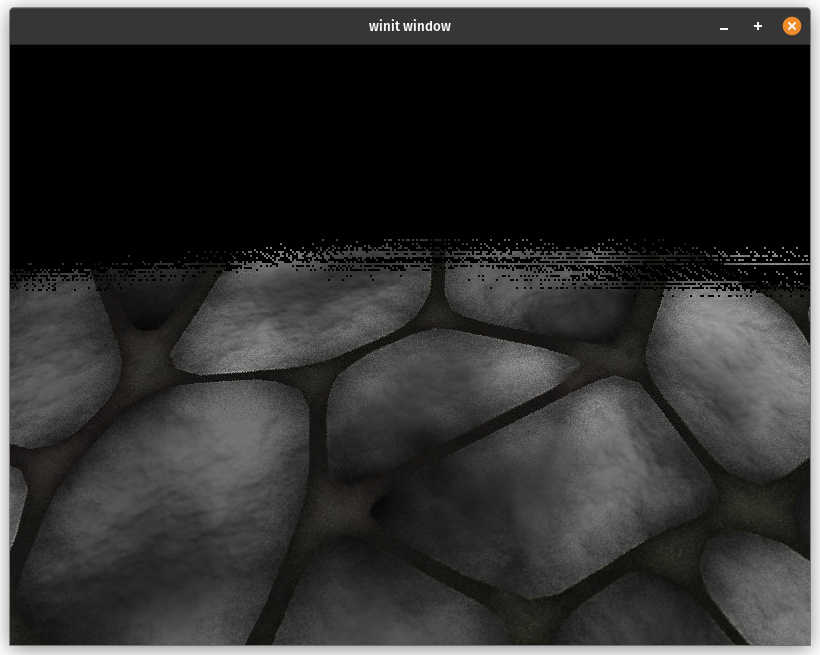
The reason for this is hinted when we used write_texture(). We need to specify what mip level we were copying to. This means that all of the other mip levels are black as that's what wgpu sets them to when creating the texture. We need to fill that data in ourselves.
We'll create a struct called Mipmapper that will generate our the other mip levels for us.
/// Pipeline for creating mipmaps
pub(crate) struct Mipmapper {
    blit_mipmap: wgpu::RenderPipeline,
    blit_sampler: wgpu::Sampler,
    compute_mipmap: wgpu::ComputePipeline,
    storage_texture_layout: wgpu::BindGroupLayout,
}

impl Mipmapper {
    pub fn new(device: &wgpu::Device) -> Self {
        // ...
    }
}
You'll see that we have two different pipelines here a RenderPipeline and a ComputePipeline. There are a lot of ways that we could generate our other mip levels, we'll show off two here: rendering, and using a compute shader.
Rendering to a mip level
When we create a RenderPass we pass in a TextureView. This view allows us to pick what part of the texture a shader is allowed to access. The GPU will render to whatever mip level is set by the base_mip_level when we create the texture view. We can use this to draw directly to specific mips which is just what we need to fill out our mipmaps.
Basically we are going to create a pipeline that will get a texture view starting at mip level 0, and render that with linear sampling to mip level 1. We'll repeat this for 1 -> 2, 2 -> 3, etc. until we get to the last level, in this case 10.
First we have to create the pipeline.
impl Mipmapper {
    pub fn new(device: &wgpu::Device) -> Self {
        let blit_shader = wgpu::include_wgsl!("blit.wgsl");
        let blit_format = wgpu::TextureFormat::Rgba8Unorm;
        let blit_mipmap = RenderPipelineBuilder::new()
            .vertex_shader(blit_shader.clone())
            .fragment_shader(blit_shader.clone())
            .cull_mode(Some(wgpu::Face::Back))
            .color_solid(blit_format)
            .build(device)
            .unwrap();
        let blit_sampler = device.create_sampler(&wgpu::SamplerDescriptor {
            min_filter: wgpu::FilterMode::Linear,
            mag_filter: wgpu::FilterMode::Linear,
            ..Default::default()
        });

        // ...
    }
}
We're using a custom RenderPipelineBuilder to make setting up the render pipeline easier. In this case this just creates a render pipeline with a vertex and fragment shader defined in blit.wgsl that expects to render to a Rgba8Unorm texture with back face culling enabled.
We also need a sampler with linear sampling enabled so each mipmap blends seamlessly with the one above it.
Next let's look at blit.wgsl:
struct VertexOutput {
    @builtin(position) clip_position: vec4<f32>,
    @location(0) uv: vec2<f32>,
};

@group(0)
@binding(0)
var tex: texture_2d<f32>;
@group(0)
@binding(1)
var tex_sampler: sampler;

@vertex
fn vs_main(
    @builtin(vertex_index) in_vertex_index: u32,
) -> VertexOutput {
    var out: VertexOutput;
    // Create fullscreen triangle
    let x = f32((in_vertex_index << 1u) & 2u);
    let y = f32(in_vertex_index & 2u);
    out.clip_position = vec4<f32>(x * 2.0 - 1.0, y * 2.0 - 1.0, 0.0, 1.0);
    out.uv = vec2<f32>(x, 1.0 - y);
    return out;
}

@fragment
fn fs_color(in: VertexOutput) -> @location(0) vec4<f32> {
    let sample = textureSample(tex, tex_sampler, in.uv);
    return sample;
}
This shader draws a triangle that is bigger than the viewport (in this case the mip level we are rendering to). It then samples a texture and outputs that sample directly.
Next we will create a function to actually use all of this.
impl Mipmapper {
    // ...

    pub fn blit_mipmaps(
        &self,
        device: &wgpu::Device,
        queue: &wgpu::Queue,
        texture: &wgpu::Texture,
    ) -> anyhow::Result<()> {
        // We would need to change the render pipeline to support different texture types
        match texture.format() {
            wgpu::TextureFormat::Rgba8Unorm | wgpu::TextureFormat::Rgba8UnormSrgb => {}
            _ => bail!("Unsupported format {:?}", texture.format()),
        }

        // Exit early if there is only one mip level.
        if texture.mip_level_count() == 1 {
            return Ok(());
        }

        let mut encoder = device.create_command_encoder(&Default::default());

        // We need to render to this texture, so if the supplied texture
        // isn't setup for rendering, we need to create a temporary one.
        let (mut src_view, maybe_temp) = if texture
            .usage()
            .contains(wgpu::TextureUsages::RENDER_ATTACHMENT)
        {
            (
                texture.create_view(&wgpu::TextureViewDescriptor {
                    // sRGB and non sRGB textures can be interchanged, but
                    // we specified RGBA8Unorm when we created the pipeline
                    // so we need a view with the same format.
                    format: Some(texture.format().remove_srgb_suffix()),
                    base_mip_level: 0,
                    // When rendering to a mip we need to ignore all other
                    // mip levels.
                    mip_level_count: Some(1),
                    ..Default::default()
                }),
                None,
            )
        } else {
            // Create a temporary texture that can be rendered to since the
            // supplied texture can't be rendered to. It will be basically
            // identical to the original apart from the usage field and removing
            // sRGB from the format if it's present.
            let temp = device.create_texture(&wgpu::TextureDescriptor {
                label: Some("Mipmapper::compute_mipmaps::temp"),
                size: texture.size(),
                mip_level_count: texture.mip_level_count(),
                sample_count: texture.sample_count(),
                dimension: texture.dimension(),
                format: texture.format().remove_srgb_suffix(),
                usage: wgpu::TextureUsages::RENDER_ATTACHMENT
                    | wgpu::TextureUsages::TEXTURE_BINDING
                    | wgpu::TextureUsages::COPY_DST
                    | wgpu::TextureUsages::COPY_SRC,
                view_formats: &[],
            });

            encoder.copy_texture_to_texture(
                texture.as_image_copy(),
                temp.as_image_copy(),
                temp.size(),
            );

            (
                temp.create_view(&wgpu::TextureViewDescriptor {
                    mip_level_count: Some(1),
                    ..Default::default()
                }),
                Some(temp),
            )
        };

        for mip in 1..texture.mip_level_count() {
            let dst_view = src_view
                .texture()
                .create_view(&wgpu::TextureViewDescriptor {
                    format: Some(texture.format().remove_srgb_suffix()),
                    // What mip we want to render to
                    base_mip_level: mip,
                    // Like src_view we need to ignore other mips
                    mip_level_count: Some(1),
                    ..Default::default()
                });

            let texture_bind_group = device.create_bind_group(&wgpu::BindGroupDescriptor {
                label: None,
                layout: &self.blit_mipmap.get_bind_group_layout(0),
                entries: &[
                    wgpu::BindGroupEntry {
                        binding: 0,
                        resource: wgpu::BindingResource::TextureView(&src_view),
                    },
                    wgpu::BindGroupEntry {
                        binding: 1,
                        resource: wgpu::BindingResource::Sampler(&self.blit_sampler),
                    },
                ],
            });

            let mut pass = encoder.begin_render_pass(&wgpu::RenderPassDescriptor {
                label: None,
                color_attachments: &[Some(wgpu::RenderPassColorAttachment {
                    view: &dst_view,
                    depth_slice: None,
                    resolve_target: None,
                    ops: wgpu::Operations {
                        load: wgpu::LoadOp::Load,
                        store: wgpu::StoreOp::Store,
                    },
                })],
                depth_stencil_attachment: None,
                timestamp_writes: None,
                occlusion_query_set: None,
                multiview_mask: None,
            });
            pass.set_pipeline(&self.blit_mipmap);
            pass.set_bind_group(0, &texture_bind_group, &[]);
            pass.draw(0..3, 0..1);

            // Make sure that we use the mip we just generated for the
            // next iteration.
            src_view = dst_view;
        }

        // If we created a temporary texture, now we need to copy it back
        // into the original.
        if let Some(temp) = maybe_temp {
            let mut size = temp.size();
            for mip_level in 0..temp.mip_level_count() {
                encoder.copy_texture_to_texture(
                    wgpu::TexelCopyTextureInfo {
                        mip_level,
                        ..temp.as_image_copy()
                    },
                    wgpu::TexelCopyTextureInfo {
                        mip_level,
                        ..texture.as_image_copy()
                    },
                    size,
                );

                // Each mipmap is half the size of the original,
                // so we need to half the copy size as well.
                size.width /= 2;
                size.height /= 2;
            }
        }

        queue.submit([encoder.finish()]);

        Ok(())
    }

    // ...
}
With all that we can create our Mipmapper and call blit_mipmaps with our texture.
let mipmapper = Mipmapper::new(&display.device);
mipmapper.blit_mipmaps(&display.device, &display.queue, &diffuse_blit_texture)?;
With that our texture looks great even at far distances.
You may have noticed that when we created the render pipeline we used the texture format RgbaUnorm, if we wanted to support a different format we'd need to create a separate pipeline to render to that format. All of the textures in this guide are either RgbaUnorm or RgbaUnormSrgb, so I only added support for the one.
It's important that you pick a texture format that you can render to, as this method will not work otherwise. You can check out the WebGPU specification for how to tell if a format is renderable or not.
Generating mipmaps with a compute shader
While drawing to mips directly using a render pipeline works just fine, there are times where we want to store data in the mip chain of a texture in a compute shader. It's going to be a little more work than the the rendering example so lets get started with the shader.
@group(0)
@binding(0)
var src: texture_storage_2d<rgba8unorm, read>;
@group(0)
@binding(1)
var dst: texture_storage_2d<rgba8unorm, write>;

@compute
@workgroup_size(16, 16, 1)
fn compute_mipmap(
    @builtin(global_invocation_id) gid: vec3<u32>,
) {
    let dstPos = gid.xy;
    let srcPos = gid.xy * 2;

    let dim = textureDimensions(src);

    if (dstPos.x >= dim.x || dstPos.y >= dim.y) {
        return;
    }

    let t00 = textureLoad(src, srcPos);
    let t01 = textureLoad(src, srcPos + vec2(0, 1));
    let t10 = textureLoad(src, srcPos + vec2(1, 0));
    let t11 = textureLoad(src, srcPos + vec2(1, 1));

    // A simple linear average of 4 adjacent pixels
    let t = (t00 + t01 + t10 + t11) * 0.25;

    textureStore(dst, dstPos, t);
}
So what this shader does is take in to texture views, src will be a mip from the texture and dst will be the mip directly below that. We will that grab 4 pixels from the src texture, compute there average and store that into dst texture.
Similar to the render pipeline, this compute pipeline only works with Rgba8Unorm textures. Supporting other textures requires we modify both the shader and the bind group setup (that we'll cover next). We are also limited to textures that can be used as a storage texture.
With that done we can move on to setting up the compute pipeline.
impl Mipmapper {
    pub fn new(device: &wgpu::Device) -> Self {
        let storage_texture_layout =
            device.create_bind_group_layout(&wgpu::BindGroupLayoutDescriptor {
                label: Some("Mipmapper::texture_layout"),
                entries: &[
                    wgpu::BindGroupLayoutEntry {
                        binding: 0,
                        visibility: wgpu::ShaderStages::COMPUTE,
                        ty: wgpu::BindingType::StorageTexture {
                            access: wgpu::StorageTextureAccess::ReadOnly,
                            format: wgpu::TextureFormat::Rgba8Unorm,
                            view_dimension: wgpu::TextureViewDimension::D2,
                        },
                        count: None,
                    },
                    wgpu::BindGroupLayoutEntry {
                        binding: 1,
                        visibility: wgpu::ShaderStages::COMPUTE,
                        ty: wgpu::BindingType::StorageTexture {
                            access: wgpu::StorageTextureAccess::WriteOnly,
                            format: wgpu::TextureFormat::Rgba8Unorm,
                            view_dimension: wgpu::TextureViewDimension::D2,
                        },
                        count: None,
                    },
                ],
            });

        let pipeline_layout = device.create_pipeline_layout(&wgpu::PipelineLayoutDescriptor {
            label: None,
            bind_group_layouts: &[Some(&storage_texture_layout)],
            immediate_size: 0,
        });
        let compute_module = device.create_shader_module(wgpu::include_wgsl!("mipmap.wgsl"));
        let compute_mipmap = device.create_compute_pipeline(&wgpu::ComputePipelineDescriptor {
            label: Some("Mipmapper"),
            layout: Some(&pipeline_layout),
            module: &compute_module,
            entry_point: Some("compute_mipmap"),
            compilation_options: Default::default(),
            cache: None,
        });
    }

    // ...
}
With that in place we can create a function to use the compute pipeline.
impl Mipmapper {
    pub(crate) fn compute_mipmaps(
        &self,
        device: &wgpu::Device,
        queue: &wgpu::Queue,
        texture: &wgpu::Texture,
    ) -> anyhow::Result<()> {
        // We would need to change the shader to support different texture types
        match texture.format() {
            wgpu::TextureFormat::Rgba8Unorm | wgpu::TextureFormat::Rgba8UnormSrgb => {}
            _ => bail!("Unsupported format {:?}", texture.format()),
        }

        if texture.mip_level_count() == 1 {
            return Ok(());
        }

        let mut encoder = device.create_command_encoder(&Default::default());

        // Create temp texture if supplied texture isn't setup for use
        // as a storage texture
        let (mut src_view, maybe_temp) = if texture
            .usage()
            .contains(wgpu::TextureUsages::STORAGE_BINDING)
        {
            (
                texture.create_view(&wgpu::TextureViewDescriptor {
                    mip_level_count: Some(1),
                    ..Default::default()
                }),
                None,
            )
        } else {
            let temp = device.create_texture(&wgpu::TextureDescriptor {
                label: Some("Mipmapper::compute_mipmaps::temp"),
                size: texture.size(),
                mip_level_count: texture.mip_level_count(),
                sample_count: texture.sample_count(),
                dimension: texture.dimension(),
                format: texture.format().remove_srgb_suffix(),
                usage: wgpu::TextureUsages::STORAGE_BINDING
                    | wgpu::TextureUsages::COPY_DST
                    | wgpu::TextureUsages::COPY_SRC,
                view_formats: &[],
            });

            encoder.copy_texture_to_texture(
                texture.as_image_copy(),
                temp.as_image_copy(),
                temp.size(),
            );

            (
                temp.create_view(&wgpu::TextureViewDescriptor {
                    mip_level_count: Some(1),
                    ..Default::default()
                }),
                Some(temp),
            )
        };

        let dispatch_x = texture.width().div_ceil(16);
        let dispatch_y = texture.height().div_ceil(16);

        {
            let mut pass = encoder.begin_compute_pass(&wgpu::ComputePassDescriptor::default());
            pass.set_pipeline(&self.compute_mipmap);
            for mip in 1..texture.mip_level_count() {
                let dst_view = src_view
                    .texture()
                    .create_view(&wgpu::TextureViewDescriptor {
                        base_mip_level: mip,
                        mip_level_count: Some(1),
                        ..Default::default()
                    });
                let texture_bind_group = device.create_bind_group(&wgpu::BindGroupDescriptor {
                    label: None,
                    layout: &self.storage_texture_layout,
                    entries: &[
                        wgpu::BindGroupEntry {
                            binding: 0,
                            resource: wgpu::BindingResource::TextureView(&src_view),
                        },
                        wgpu::BindGroupEntry {
                            binding: 1,
                            resource: wgpu::BindingResource::TextureView(&dst_view),
                        },
                    ],
                });
                pass.set_bind_group(0, &texture_bind_group, &[]);
                pass.dispatch_workgroups(dispatch_x, dispatch_y, 1);

                src_view = dst_view;
            }
        }

        if let Some(temp) = maybe_temp {
            let mut size = temp.size();
            for mip_level in 0..temp.mip_level_count() {
                encoder.copy_texture_to_texture(
                    wgpu::TexelCopyTextureInfo {
                        mip_level,
                        ..temp.as_image_copy()
                    },
                    wgpu::TexelCopyTextureInfo {
                        mip_level,
                        ..texture.as_image_copy()
                    },
                    size,
                );

                // Each mipmap is half the size of the original
                size.width /= 2;
                size.height /= 2;
            }
        }

        queue.submit([encoder.finish()]);

        Ok(())
    }
}
And that's it. With that we can use mipmaps with our textures!
Conclusion
We've only scratched the surface with mip maps. We will cover other ways to use them later. With that being said you can check out the code at the link below!
Supporters
Thanks to these supporters from patreon and ko-fi!
- David Laban
- Bernard Llanos
- Ian Gowen
- Aron Granberg
- 折登 樹
- Julius Liu
- Lennart
- Jani Turkia
- Feng Liang
- Lions Heart
- Paul E Hansen
- Gunstein Vatnar
- Nico Arbogast
- Dude
- Youngsuk Kim
- Alexander Kabirov
- Danny McGee
- charlesk
- yutani
- Filip
- Eliot Bolduc
- Ben Anderson
- Thunk
- IC
- Craft Links
- Zeh Fernando
- Ken
- Ryan
- Felix
- Tema
- 大典 加藤
- Andrea Postal
- Davide Prati
- dadofboi
- ツナマヨ
- Andrea Postal
- Davide Prati
- dadofboi